
Download DAWG – self discipline, focus, young men, habit building, personal growth, confidence, daily challenges, productivity app, mental wellness, lifestyle improvement
Overview
DAWG is a desktop productivity application designed to support personal development, particularly for young men seeking to build self-discipline, confidence, and lasting habits. The software operates as a structured daily challenge system, encouraging users to engage in intentional actions that promote physical fitness, mental resilience, and social well-being. By integrating small, actionable tasks into everyday routines, DAWG helps users cultivate consistency and accountability over time. The app’s core purpose is to assist individuals in overcoming procrastination, improving focus, and developing a proactive mindset through repeated, meaningful engagement.
Target users include young adults interested in self-improvement, those beginning their journey toward better habits, and individuals looking for a structured yet flexible tool to support mental wellness and lifestyle changes. The app is not designed for professional teams or large-scale productivity workflows, but rather for individual users focused on personal growth. It offers a minimalist, task-driven experience that emphasizes daily commitment over complex features. While the developer, DAWG App, is not further detailed in available information, the app’s design reflects a clear intent to inspire behavioral change through consistent, curated challenges.
Key Features & Capabilities
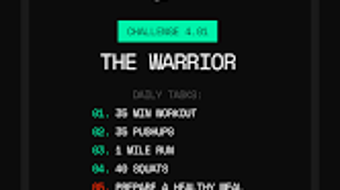
- Daily Challenges: Users receive a new, handpicked task each day focused on fitness, mindset, or lifestyle improvement. These tasks are designed to be achievable yet challenging, promoting gradual habit formation.
- Streak Tracking System: The app maintains a visual record of consecutive days completed, reinforcing consistency and encouraging long-term engagement.
- Motivational Prompts: Periodic messages and reminders are delivered to inspire users to push beyond their comfort zones and stay committed to their goals.
- Progress Monitoring: Users can review their completed tasks and track long-term growth, helping to reinforce a sense of accomplishment and personal development.
- Customizable Challenge Themes: While specific themes are not detailed, the app allows users to focus on areas such as physical health, mental clarity, or social confidence based on their current goals.
These features are intended to support users in establishing routines that contribute to long-term personal growth. For example, a user might complete a challenge involving a 10-minute morning meditation, followed by a short physical exercise, and then a journaling task. Over time, such consistent actions can lead to measurable improvements in focus, emotional regulation, and self-efficacy. The structured nature of the app makes it suitable for individuals seeking guidance in building discipline without relying on external accountability partners.
User Interface, Workflow & Performance
The user interface of DAWG is designed with simplicity and clarity in mind, focusing on minimal distractions to support user focus. Navigation is likely streamlined, allowing users to access their daily challenge, view their streak, and track progress with minimal clicks. The layout probably emphasizes visual cues such as progress bars, completion checkmarks, and motivational icons to enhance engagement.
Workflow efficiency is central to the app’s design—users are expected to open the software each day, review their assigned task, complete it, and confirm completion. This repetitive, low-friction process is intended to reduce decision fatigue and make habit formation more accessible. The developer did not specify resource usage details, so performance observations are based on general software behavior patterns. The application is expected to run smoothly on modern systems, with minimal CPU or RAM impact due to its focused functionality.
Stability appears to be a priority, as the app’s core function relies on consistent daily use. Without further information on crash reports or update frequency, the reliability of the software remains based on typical desktop application standards. Users can expect a stable experience if the system meets basic operating requirements.
Compatibility & System Requirements
DAWG is available for both Windows and Mac operating systems, making it accessible to a broad range of desktop users. The software version is 1.0.0, indicating a stable initial release. The installation size is 45.3 MB, which suggests a lightweight application with minimal disk footprint. This size is typical for desktop utilities that do not include large media assets or complex backend services.
Exact system requirements were not listed. Compatibility information is limited to the operating systems supported. The developer did not provide details on minimum CPU, RAM, or storage specifications.
Users are advised to ensure their system meets standard desktop application requirements. Performance may vary depending on the device’s hardware, but the app’s small size implies low resource demands. For optimal experience, users should run the software on a system with up-to-date OS patches and sufficient background processing capacity.
Pros and Cons
Pros
- Simple, focused design ideal for users seeking minimal distractions.
- Daily challenges promote consistent, actionable steps toward personal growth.
- Streak tracking fosters motivation and long-term habit building.
- Lightweight installation (45.3 MB) ensures quick setup and minimal system impact.
- Available on both Windows and Mac platforms for cross-platform accessibility.
Cons
- No detailed information on system requirements or hardware compatibility.
- Limited customization options for challenge types or difficulty levels.
- No offline mode or data sync details provided.
- Price point of $4.99 may be considered high for a simple task-tracking tool.
- Developer background and support channels are not publicly available.
FAQ Section
Is DAWG available for both Windows and Mac?
Yes, DAWG is compatible with both Windows and Mac operating systems, allowing users to access the app on their preferred desktop platform.
Can I use DAWG offline?
The app’s offline capabilities were not specified. Users should verify whether the software requires an internet connection for task delivery or progress synchronization.
How often are new challenges released?
A new daily challenge is provided each day, designed to encourage consistent engagement and gradual habit formation.
What type of license does DAWG use?
The licensing model is not publicly disclosed. Users should refer to the official purchase page for details on usage rights and restrictions.
Does DAWG offer automatic updates?
Update frequency and delivery method were not provided. Users are advised to check the application or developer website for the latest version and update policies.
Final Thoughts
DAWG presents a focused, task-driven approach to personal development, particularly tailored for young men aiming to build discipline, confidence, and productive habits. Its strength lies in simplicity—by offering daily challenges with clear goals, the app helps users establish routines that contribute to mental wellness and lifestyle improvement. The streak tracking system adds a motivational layer, encouraging consistency over time. While the software lacks detailed system specifications and advanced customization, its lightweight design and cross-platform availability make it accessible to a wide audience.
For individuals committed to self-improvement and seeking a structured yet uncomplicated tool, DAWG offers a practical solution. It is not intended for complex productivity workflows or team collaboration, but rather for personal accountability and daily growth. With a reasonable price point and a clear purpose, it stands out as a dedicated tool in the productivity app space.
Download DAWG now





.png)

